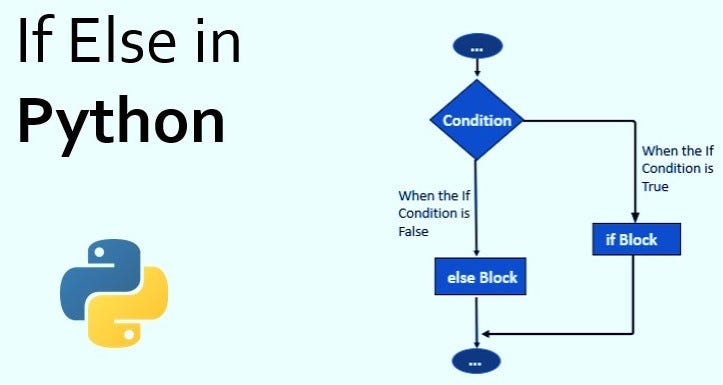
Python If, Else Statements
A type of conditional statement used in python to make decisions based on certain conditions. It can execute different parts of a given condition depending on whether it is ‘True’ or ‘False’. If it is true, the if block code is executed and if the condition is false, the else block code is executed.
Basic structure of ‘if else’ statement:
if condition:
# Code to be executed if the condition is True
else:
# Code to be executed if the condition is False
Breakdown of the components:
- ‘if’ : This keyword marks the beginning of the conditional statement.
- ‘condition’ : Replace this with the expression or condition you want to test. If it evaluates to ‘True’, the code block under the ‘if’ is executed; otherwise, the code block under the ‘else’ is executed.
- ‘else’ : This keyword is used to provide an alternative action in case the condition is False.
For example:
Checking if a number is even or odd
number = 10
if number % 2 == 0:
print(“The number is even.”)
else:
print(“The number is odd.”)
If statement
It is also known as a conditional statement. These statements are a staple of decision-making. A conditional statement takes a specific action based on a check or comparison. All in all, an ‘if’ statement makes a decision based on a condition. The condition is a Boolean expression. A Boolean expression can only be one of two values – True or False.
The syntax of ‘if’ statement in python is:
if condition:
# body of if statement
The ‘if’ statement evaluates condition.
- ‘If’ condition is evaluated to True, the code inside the body of it is executed.
- ‘If’ condition is evaluated to False, the code inside the body of it is skipped.
Example of ‘if’
Suppose you have a variable z, equal to 4. If the value is ‘even’, you will print z is ‘even’. You will use modulo operator 2, which will return 0 if z is ‘even’. As soon as you run the below code, Python will check if the condition holds. If True, the corresponding code will be executed.
z = 4
If z % 2 == 0 : # True
Print (‘‘z is even’’)
z is even
Example of multiple lines inside ‘if’ statement
It is perfectly fine to have more lines inside the if statement, as shown in the below example. The script will return two lines when you run it. If the condition is not passed, the expression is not executed.
z = 4
If z % 2 == 0 :
Print (‘’checking’’ + str(z))
Print (‘‘z is even’’)
checking 4
z is even
Example of a False if statement
Let’s change the value of z to be odd. You will notice that the code will not print anything since the condition will not be passed, i.e., False.
z = 5
If z % 2 == 0 : # False
Print (‘’checking’’ + str(z))
Print (‘‘z is even’’)
Else statement
else statement contains the block of code that executes if the conditional expression in the if statement resolves to 0 or a FALSE value.